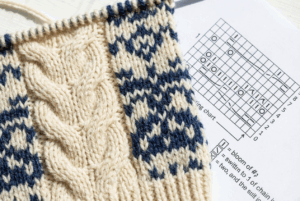
Knitting pattern reader apps have changed the way many crafters approach their projects. Instead of juggling printed pages, sticky notes, and constant row counting, knitters now rely on digital tools that quietly manage the details. From the very first stitch, these apps make the process feel calmer and more controlled.
If you have ever lost your place in a pattern or questioned whether you finished the last repeat, you are not alone. Knitting should feel soothing, yet small disruptions can quickly pull you out of the moment. That is why more knitters are turning to pattern reading apps that support focus rather than frustration.
In this article, you will discover how these tools work, which options stand out, and how to choose the right one for your knitting style. Whether you knit simple scarves or detailed garments, the right app can transform your experience.
Why Knitting Pattern Reader Apps Make Knitting Easier
At its core, knitting is a balance between creativity and precision. While that balance is part of the charm, it can also become overwhelming. Paper patterns crease, handwriting fades, and mental tracking drains energy.
Knitting pattern reader apps remove many of these friction points. They keep patterns clean, readable, and always accessible. More importantly, they shift the burden of remembering away from your mind and onto the screen.
Because progress tracking becomes visual and consistent, mistakes happen less often. As a result, confidence grows with each session. Knitting begins to feel less like a task and more like a rhythm.
Another advantage is portability. With patterns stored digitally, you can knit anywhere without preparation. A few taps are all it takes to begin.
Key Features to Look for in Knitting Pattern Reader Apps
Not every app suits every knitter. However, certain features consistently improve the experience.
Ease of use is essential. A good pattern reader should feel intuitive, even during your first project. Clear navigation and readable layouts matter more than advanced extras.
Support for PDF patterns is another must-have. Many knitters purchase downloadable designs, so smooth importing saves time. Annotation tools also help when you need to mark changes or add reminders.
Row tracking is where stress truly melts away. Whether automatic or manual, counters prevent guesswork and repeated counting. Adjustable highlights and text sizes further reduce eye strain.
Offline access also plays a role. Reliable apps allow you to knit without worrying about connectivity. Stability builds trust, especially during complex projects.
Popular Knitting Pattern Reader Apps Knitters Love
Several well-known knitting pattern reader apps dominate the crafting world. Each one offers a slightly different approach, which makes comparison useful.
KnitCompanion: Advanced Knitting Pattern Reader App
KnitCompanion is often recommended for experienced knitters who manage complex patterns. It supports charts, written instructions, and layered tracking tools.
Its movable highlight bars guide your eyes across rows, which reduces fatigue during long sessions. Multiple counters can be attached to a single project, making repeats easier to manage.
Although it requires some setup, many knitters feel the payoff is worth it. Once configured, the app becomes a powerful assistant that fades into the background.
Pattern Keeper: Simple Knitting Pattern Reading Tool
Pattern Keeper focuses on simplicity. It reformats text-based patterns into individual rows that can be highlighted as you work.
This app appeals to knitters who want clarity without distraction. Progress tracking feels natural, and notes stay organized.
While it is not ideal for heavy chart use, it shines with straightforward instructions. For many knitters, less complexity means more calm.
GoodNotes as a Flexible Pattern Reader Option
Although GoodNotes is not built specifically for knitting, it is widely used as a pattern reading solution. Its strength lies in customization.
You can import patterns, annotate freely, and adjust layouts to suit your preferences. This flexibility works well for knitters who enjoy writing detailed notes.
Because it lacks built-in counters, it relies more on manual systems. Still, many knitters appreciate the creative control it offers.
Knitting Chart Apps for Visual Pattern Readers
Some knitters think visually rather than verbally. For them, chart-based knitting apps provide a better experience.
These tools focus on symbol charts, offering automatic row highlighting. Lace and colorwork patterns become easier to follow when visual cues guide progress.
While they may not replace text-focused apps, they work well as companions for chart-heavy projects.
Ravelry Apps for Pattern Organization
Ravelry’s mobile apps support pattern storage and project tracking rather than detailed reading. Even so, they play an important role.
Many knitters use Ravelry alongside knitting pattern reader apps to keep everything organized. Together, they create a smooth workflow from discovery to completion.
How Knitting Pattern Reader Apps Reduce Stress
Knitting stress often comes from mental overload. Remembering counts, tracking repeats, and managing changes all compete for attention.
Pattern reading apps remove much of that pressure. Visual highlights show exactly where you are. Counters remember progress accurately. Notes capture decisions instantly.
Because fewer mistakes occur, frustration fades. Knitting sessions feel smoother and more predictable. Over time, confidence replaces hesitation.
Consistency also helps. When every project follows the same digital system, your brain relaxes. Familiar routines create comfort and flow.
Choosing the Right Knitting Pattern Reader App for You
No single app fits every knitter. Your preferences, project types, and devices all influence the best choice.
If you knit complex garments with charts and shaping, advanced knitting pattern reader apps may serve you best. If you prefer simple projects, minimalist tools feel lighter.
Tablet users often enjoy larger screens and annotation features. Phone users may value portability and quick access.
Trying free versions is a smart move. A few sessions usually reveal whether an app supports or distracts from your process.
The best app is the one you forget is there while knitting.
Tips for Better Results with Knitting Pattern Reader Apps
Even the best tools work better with good habits.
Set up each project carefully before you begin. Confirm pattern versions and page order to avoid confusion later.
Adjust visual settings early. Comfortable fonts and colors reduce eye strain during long sessions.
Use notes generously. Record yarn substitutions, needle sizes, and reminders for future reference.
Back up your data when possible. Cloud syncing protects progress and offers peace of mind.
Most importantly, give yourself time. Familiarity improves efficiency and enjoyment.
Are Knitting Pattern Reader Apps Worth Using?
Some knitters worry that technology may disrupt the handmade feel of knitting. However, many find the opposite to be true.
By removing logistical frustrations, these apps allow creativity to shine. Knitting becomes more about rhythm and less about problem-solving.
For knitters managing multiple projects, digital tools feel almost essential. Everything stays accessible and organized.
Ultimately, the value lies in reduced stress. When knitting feels calm again, motivation naturally increases.
Conclusion
Knitting pattern reader apps have quietly reshaped modern knitting. By simplifying tracking and organization, they restore the peaceful nature of the craft.
Whether you choose a feature-rich solution or a simple reader, the right app can make every session smoother. When stress fades, enjoyment takes its place.
If knitting is your escape, these tools can help protect that space and make every stitch feel lighter.
FAQ
- What are knitting pattern reader apps used for?
They help knitters read patterns digitally, track rows, add notes, and reduce mistakes during projects. - Are knitting pattern reader apps beginner-friendly?
Yes, many are designed to be intuitive and can make learning easier by simplifying pattern tracking. - Do these apps work offline?
Most allow offline access once patterns are downloaded, which is ideal for travel or quiet knitting time. - Can knitting pattern reader apps be used on phones and tablets?
Yes, many support both, although tablets often provide a more comfortable viewing experience. - Are paid knitting pattern reader apps worth it?
For frequent knitters or complex patterns, premium features often save time and reduce frustration.